For years, the AEO tool you used was a tab in your browser. You logged in, clicked around a dashboard, exported a report, and closed the tab.
That workflow made sense when humans were the only ones operating the software, but that’s starting to change.
A lot of marketers don’t sit in the dashboard anymore. They hand the work to an AI agent like Claude Code, and the question becomes whether that agent can actually use the tools they’re paying for.
That’s where a CLI and an MCP server come in. An AEO tool with a CLI and an MCP server can be used in two new ways. A person can run it from the terminal. An AI agent can call it directly inside the environment where the work is already happening.
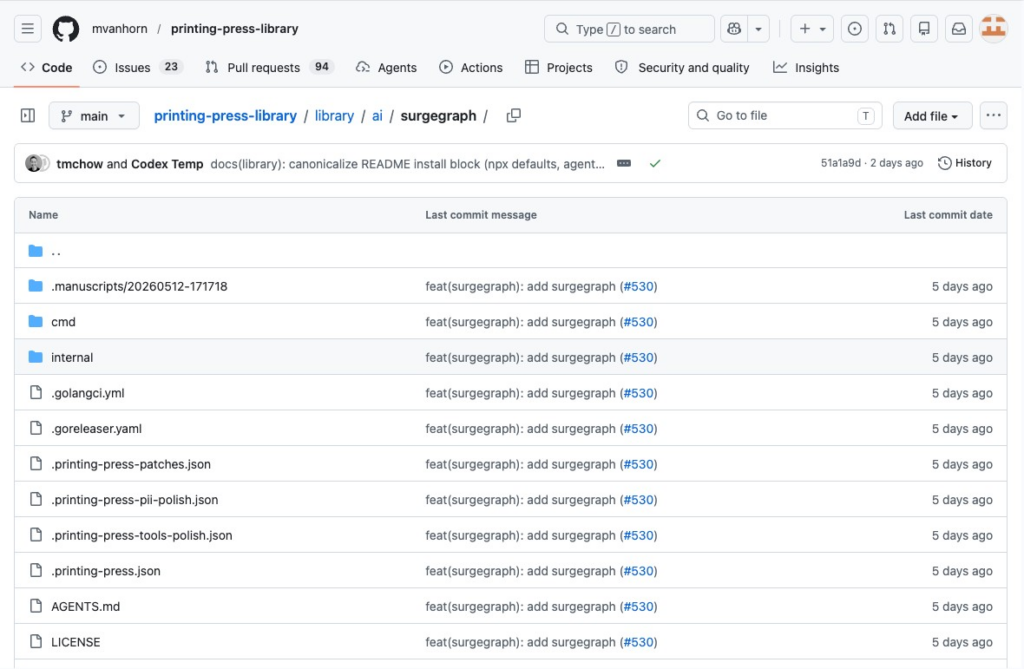
SurgeGraph just shipped exactly that: a command-line interface, an MCP server, and a Claude Code skill, bundled together and published as pp-surgegraph.
That may sound technical at first. But the practical idea is simple.
Instead of treating AEO as a dashboard you visit after the work is done, SurgeGraph now lets your agent bring AEO into the work itself. Research, scoring, fixes, publishing, and reporting can happen from the terminal or through an AI assistant.
I’ll be honest. The first time someone told me to “just call the AEO tool from the terminal,” I pictured a wall of green text and quietly closed the laptop. Turns out the idea is simpler than the jargon makes it sound.
Now, let’s go ahead and unpack all of that.
What an AEO Tool With a CLI and MCP Server Actually Does
Three terms get thrown around together, and they’re not the same thing.
A CLI (command-line interface) lets you run the tool by typing commands instead of clicking buttons. For an AEO workflow, that could mean researching a keyword, generating a draft, checking your AI citations, publishing content, or pulling performance data, all from the terminal.
An MCP server is the connection layer that lets an AI agent use external tools. MCP (Model Context Protocol) is the open standard that helps AI agents connect to software, data, and workflows outside the chat window.
A skill is a focused instruction layer that tells an agent like Claude Code how to use the tool properly, so you don’t have to explain it every time.
Put together, they turn an AEO platform from something you operate by hand into something an agent can operate for you.
SurgeGraph’s release packages all three.
The CLI is a single Go binary that exposes SurgeGraph’s AEO and GEO workflows as terminal commands. The MCP server lets compatible AI tools register SurgeGraph as a tool. The Claude Code skill gives agents a focused interface for using SurgeGraph inside Anthropic’s Claude Code environment.
This is what people mean now when they say a tool is “agent-callable.”
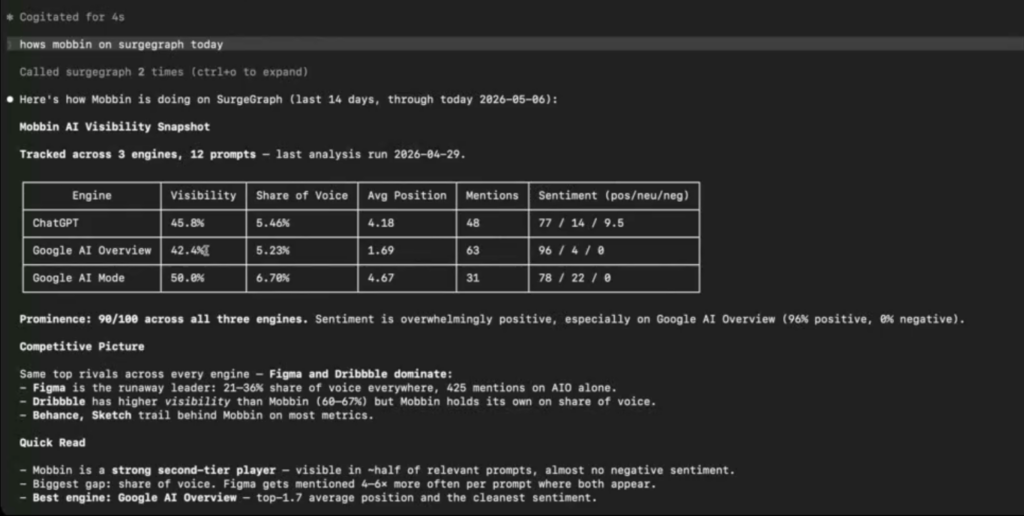
A terminal session running an agent-native AEO command looks like this:
1. CLI vs MCP Server: Which One AI Agents Actually Prefer
Here’s a debate playing out across dev teams right now: when an agent needs to use a tool, should it call a CLI or an MCP server?
Both work. They make different trade-offs.
MCP servers are flexible and well-structured, but every tool an agent loads eats into its context window. Load enough of them and the agent spends its budget reading tool descriptions instead of doing work.
CLIs tend to be leaner. A growing argument among engineers is that command-line tools give agents the same power with less context overhead, because the agent only pulls in the command it needs.
The practical answer for most marketers? You shouldn’t have to pick.
SurgeGraph ships the CLI, the MCP server, and the Claude Code skill together. That means the workflow can fit different environments. If your agent works best through terminal commands, use the CLI. If your AI tool supports MCP, connect the MCP server. If you are working in Claude Code, use the bundled skill.
It also bundles a local SQLite mirror, which means an agent can query SurgeGraph data locally instead of making a remote API call for every small step.
For simple use cases, that may sound minor. But once an agent starts asking compound questions, comparing records, or checking multiple parts of a workflow, local access can make the whole experience faster and more efficient.
And that leads to the bigger point.
2. Why Agent-Callable AEO Tools Are Taking Over
The audience of the internet is changing.
People still search. But more and more of the actual reading, comparing, and citing is done by AI agents working on someone’s behalf. In that world, the tools that help content win in AI answers benefit from being callable by agents themselves.
Want to try SurgeGraph for free?
Generate 20 documents
SEO tools (Auto Optimizer, Internal Linking, and more)
There’s now a real playbook for it. Google AI director Addy Osmani published a framework in April 2026 on what he calls agentic engine optimization, and the core idea is brutally practical: agents work inside a token budget, so content has to be lean and frontloaded or it gets truncated.
His suggested ceilings put hard numbers on it.
Osmani’s guidance caps content length by type so agents can read it fully:
The same principle applies to AEO tools.
If a tool needs too much explanation before an agent can use it, the agent becomes slower and less reliable. A lean CLI, a focused MCP server, and a clear skill file give the agent more room to understand the task, call the right workflow, and return useful output.
That is why CLI design, MCP structure, and local data access matter.
3. What to Look For in an AEO Tool’s CLI or MCP Server
Not every “we have an MCP server” claim means the same thing. If you’re evaluating an AEO tool you intend to run from an agent, here’s what actually separates the real ones.
a) Token efficiency
The tool should be lean to call. If loading it costs your agent half its context window, you’ll feel it on every task. Ask whether the CLI is designed for low token usage, not just whether it exists.
b) A local data mirror
Round-tripping to a remote API for every small query is slow and expensive. A local mirror (SurgeGraph uses a SQLite one) lets an agent ask compound questions and work offline.
c) Full workflow coverage
A citation-tracking endpoint alone isn’t enough. The strongest tools expose the whole loop: researching opportunities, generating drafts, publishing, and monitoring AI citation performance. SurgeGraph’s bundle covers all four.
d) Read-safe controls
You want to know an agent can read your data without accidentally changing it. Granular, read-only options are a sign the tool was built for delegation, not just demos.
e) Cross-environment support
Your agent today might be Claude Code. Tomorrow it’s Codex or something newer. SurgeGraph’s CLI runs on macOS, Linux, and Windows and works across MCP-compatible environments, so you’re not locked to one.
Run any tool against this list and the marketing claims separate fast from the real capability.
A clean AEO score and citation view is the kind of output an agent pulls through the CLI.
4. What Running SurgeGraph From an Agent Actually Looks Like
The fastest way to feel the difference is to compare the before and after.
Here’s the old way. You open the dashboard, run competitor research on a keyword, copy the findings into a doc, switch to the writer, generate a draft, paste it into WordPress, then come back days later to check whether AI engines picked it up.
Six tabs and a lot of copy-paste.
Here’s the new way. You’re already in Claude Code, mid-thought on a client project. You ask your agent to find a content opportunity, draft it against what actually ranks, and publish.
The agent calls SurgeGraph through the CLI. It pulls the research, generates the draft grounded in real competitive data, and publishes, all in the same window you were already working in.
Later, you ask it how that page is doing in AI answers. It checks the citation data and tells you.
You never opened a seventh tab.
That’s the shift. The dashboard is still useful. It is still the best place for visual analysis, review, and client-friendly workflows, but it is no longer the only door into the workflow.
Setting up the SurgeGraph skill inside an agent takes a single connection:
5. How SurgeGraph Tracks, Scores, and Fixes AI Citations
Being callable by an agent only matters if the agent is calling something useful.
Want to try SurgeGraph for free?
Generate 20 documents
SEO tools (Auto Optimizer, Internal Linking, and more)
Under the CLI and MCP server is the actual SurgeGraph platform, which is built around the answer engine optimization loop.
SurgeGraph tracks how your brand shows up across ChatGPT, Perplexity, Gemini, Google AI Mode, and Google AI Overview, so you can see where you’re cited and where you’re invisible.
It scores your web pages for citation readiness, analyzing the structural patterns AI engines use when they pick which sources to quote.
It fixes on-page issues with targeted improvements designed to increase the likelihood of being surfaced in AI-generated answers.
And it reports, with white-label AI visibility reports you can hand straight to a client.
The point of making all of that agent-callable is simple. The intelligence that tells you what to write, and the execution that writes and publishes it, now live in the same place your agent already works.
What This Changes for Agencies and Content Teams
For a solo creator, CLI and MCP support may feel like a convenience.
For agencies and content teams, it is more than that.
Your bottleneck was never ideas. It was the hours spent shuttling work between tools across a dozen client projects.
When your AEO platform is agent-callable, an agent can run research, drafting, and citation checks across those projects without you babysitting every step. That’s more output from the same headcount, not a bigger team.
The client-facing side still holds. You can pull a white-label report for a review call, then drop back into the terminal for the production work.
For a lean team, that combination is the whole game: keep the polished reporting clients see, automate the repetitive production they don’t.
Final Thoughts
The shift underneath all of this is simple. The internet’s reading is moving from people to agents, and the tools we use to win in AI answers are following them there.
SurgeGraph was built to track how AI models cite your content, score your pages for citation readiness, and fix what’s holding them back. Now that whole workflow runs where your agents already work: the terminal, Claude Code, Codex, or any MCP-compatible environment.
If your AEO is still trapped in a browser tab, this is the part worth trying. You can explore SurgeGraph and run its AEO workflows by hand or hand them straight to an agent, whichever fits how you work.
The dashboard isn’t going anywhere. It just stopped being the only way in.
Frequently Asked Questions (FAQs)
What is an MCP server in the context of an AEO tool?
An MCP server lets an AI assistant connect to an AEO tool and use it directly. In SurgeGraph’s case, the MCP server allows compatible AI environments to register SurgeGraph as a tool, so agents can work with SurgeGraph workflows from inside the environment where the user is already working.
What’s the difference between an AEO tool’s CLI and its MCP server?
The CLI lets you (a human) run the tool by typing terminal commands. The MCP server lets an AI agent run it for you. SurgeGraph ships both, plus a Claude Code skill, so you can work either way.
Do I still need the web app if I use the SurgeGraph CLI?
A SurgeGraph account is still required, and the web app remains fully available. The CLI and MCP server extend the same platform to the terminal and to AI agents, they don’t replace the dashboard.
Which AI environments can call SurgeGraph?
The CLI runs on macOS, Linux, and Windows, and the MCP server works in MCP-compatible environments including Claude Code and Codex. The bundled skill is tuned for Claude Code specifically.
Why does token efficiency matter for an agent-callable AEO tool?
AI agents operate inside a limited context window. A tool that uses fewer tokens to describe and run itself leaves the agent more room to do the actual work, which means faster, cheaper, more reliable runs.
Is this mainly for developers?
No. The CLI will feel familiar to technical users, but the main benefit is workflow speed. Agencies, content teams, and marketing operators can use AI agents to reduce tab-switching, automate repetitive steps, and keep research, writing, publishing, and monitoring closer together.
NOTE:
This article was written by SurgeGraph's AI writer using a custom Author Synthesis voice profile, then reviewed by a human editor. Author Synthesis learns a brand's voice from real writing samples so generated content matches its tone, cadence, and phrasing. Right: Never miss out on expert AI visibility tips & strategies
Eli Taylor
Digital Marketer at SurgeGraph
Eli lives and breathes digital marketing and AI. He always seeks new ways to combine AI with marketing strategies for more effective and efficient campaign executions. When he’s not tinkering with AI tools, Eli spends his free time playing games on his computer.
Never miss out on expert SEO tips & strategies
4.8/5.0 Rating on G2
5.0/5.0 Rating on Product Hunt
4.6/5.0 Rating on Trustpilot
Want AI to citeyou, not your rivals?
Trusted by 10,000+ marketers, agencies, and SEO teams
SurgeGraph is the AEO platform brands trust to win AI visibility.